Standard automations are no longer enough. n8n lets you build workflows that don't just move data around — they understand and process it with AI. Here's how we're using it at Smartbrand.
We're living in a moment where everything moves fast, and marketing agencies and brands can no longer afford to lose hours on mechanical tasks.
However, standard automation — the kind that simply moves a piece of data from point A to point B — is falling short.
Today, the market demands cognitive automation: workflows that don't just move information but understand it, process it with Artificial Intelligence and make decisions.
This is where n8n comes in — the tool that's revolutionising the way cutting-edge agencies like Smartbrand build their digital ecosystems.
What is n8n and why is it different?
n8n is a node-based workflow automation tool. Unlike closed competitors, n8n is "fair-code", which allows both technical users and marketers to build complex connections between more than 400 applications in a visual way.
The concept of "Nodes"
Picture a set of LEGO bricks. Each piece is a "node" that represents an action: receiving an email, querying a database, asking ChatGPT something or posting on Twitter. In n8n, you connect these pieces to create a Workflow.
The big difference: self-hosting and privacy
Unlike Zapier or Make, where your data lives on their servers, n8n allows self-hosting. This means it can be installed on the agency's or the client's own servers. For brands handling sensitive data or that must strictly comply with GDPR, n8n is the most secure and robust option on the market.
The key piece: n8n + Artificial Intelligence
What has really propelled n8n over the past year is its native integration with the AI ecosystem. While other tools offer basic integrations with OpenAI, n8n lets you build complete AI Agents.
What can you do with n8n's AI nodes?
- Chains of thought: you can chain several requests to a large language model (LLM) so that it carries out complex tasks step by step.
- Message memory: allows the AI to "remember" previous interactions within a workflow — ideal for personalised chatbots.
- Document loading (Vector Stores): you can connect n8n to a database that holds your brand's style guides or your SEO reports. The AI will consult those documents before responding, ensuring that the generated content stays consistent with the brand.
- Tool use by the AI: you can give the AI "permissions" so that, if it needs a piece of data it doesn't have, it can decide on its own to query an external API or a spreadsheet.
Real-world use cases: n8n at Smartbrand
The best way to understand n8n's potential is to see how we ourselves use it in the day-to-day running of the agency. These aren't theoretical examples — they're workflows that are live and running right now.
Reporting: real-time data with no waiting
One of the most common problems when managing accounts with large volumes of data is the load time of visualisation tools. With certain clients, generating a Looker report could take several minutes, turning every review into a bottleneck.
The solution was to build workflows in n8n that extract, process and structure the data before it reaches the visualisation layer. The result is reporting that loads almost instantly, with data that's always up to date and doesn't depend on third-party processing times.
Internal operations: the agency as a system
n8n also runs "inside" Smartbrand, managing processes that previously required manual attention. From automatic alerts when a workflow fails to team notifications when specific events occur, we've turned operational oversight into something proactive. The team doesn't have to go looking for problems — the problems come to them, with context, ready to be resolved.
Social Media: three workflows that transform operations

HAL, the assistant with brand memory
HAL is our AI assistant built on n8n, connected to the client's own database and to the Claude API.
When someone on the team (or on the client side) asks the assistant a question, the workflow automatically detects what type of information is needed, launches searches in parallel, combines and sorts the results, and sends the context to Claude to generate the response.
The result is an assistant that doesn't improvise: it consults the real catalogue, the posting history, the metrics and the brand guidelines before responding.
From Monday to LATE: scheduling without the manual work
Managing the upload and scheduling of content for social media involves repetitive steps that used to eat into the team's time.
We've now built a workflow that starts from Monday (where the editorial calendar is managed), detects the items ready to be published and schedules them straight into LATE. What used to be a manual process with several points of friction now happens automatically the moment the content has the right status in the project manager.
Validation – Editorial calendar: the client approves and gives feedback with a single click
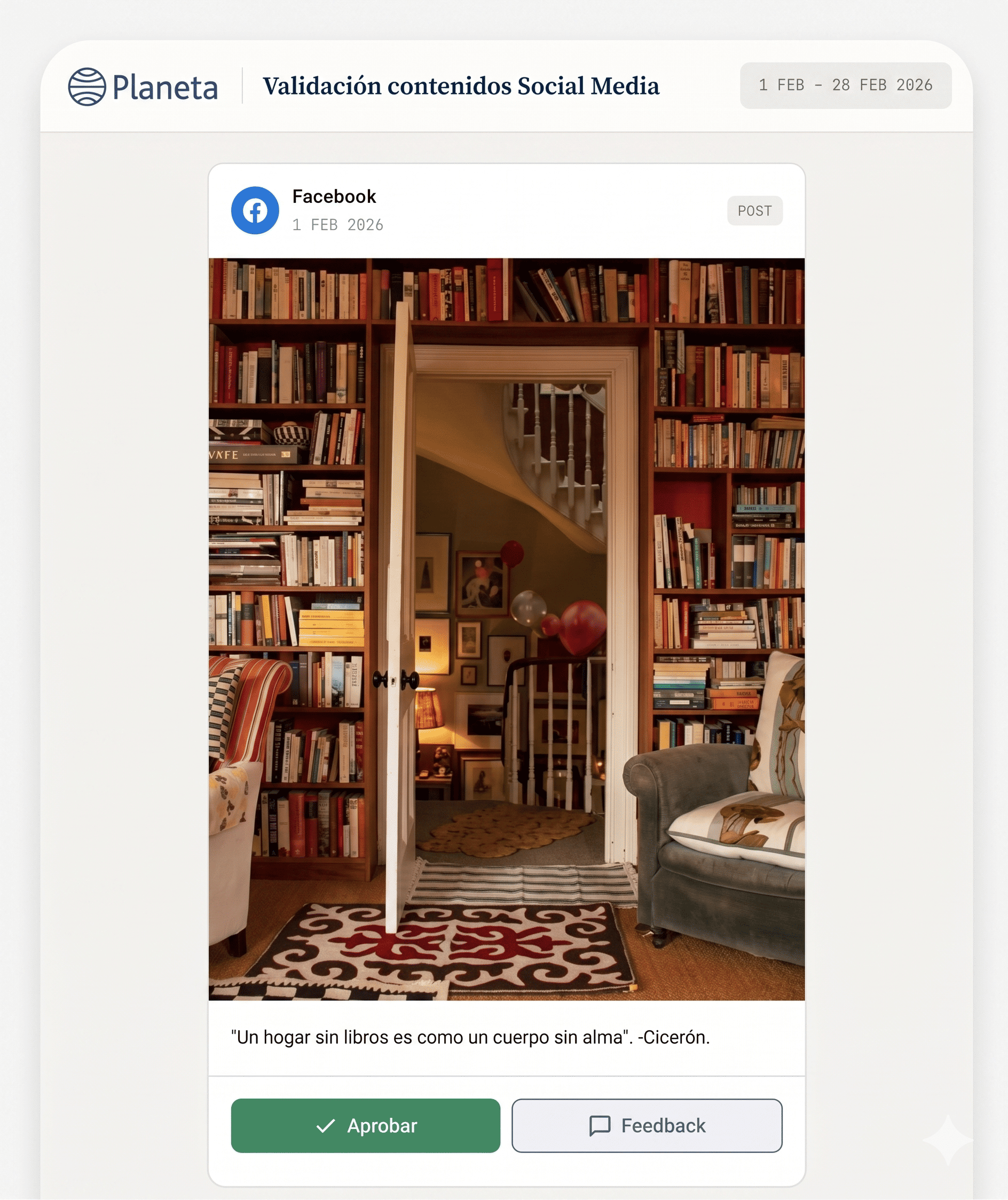
For the client's sign-off on the editorial calendar, we've developed a workflow that automatically generates an HTML view of the scheduled content.
The client receives a link, reviews the posts in a clean environment, and can approve them or request changes without needing to access any internal tool.
The workflow captures the response and updates the status in the system. Fewer emails, fewer misunderstandings and an approval process that runs on its own.
n8n vs. Zapier vs. Make: which one to choose?
This is the million-pound question for any marketing department. Here's a direct comparison:
When should you choose n8n? When your volume of automations is high (which is where Zapier becomes extortionately expensive), when you need the AI to handle proprietary data securely, or when you require custom logic that off-the-shelf tools don't allow.
Why we use n8n to transform your brand
At Smartbrand, we understand that technology is a means, not an end. Implementing n8n in our strategies lets us:
- Cut operational costs: what used to require a team of three people for reporting is now done automatically, freeing that talent up to focus on creative strategy.
- Complete personalisation: we don't adapt to the tools — we make the tools adapt to the client's business. If an API exists, n8n can connect to it.
- Constant innovation: because we have full control over the code and the AI nodes, we can experiment with the latest models (such as Claude 3.5 or GPT-4o) ahead of anyone else.
Conclusion
n8n isn't just an "automation" tool — it's the central nervous system that allows a modern digital marketing agency to operate at a scale and speed that was previously unimaginable. By combining the power of AI with the flexibility of open source, n8n becomes the perfect ally for brands that are looking not just to be present, but to dominate their niche.
If your brand is ready to stop doing manual tasks and start building technological assets, automation with n8n and AI is the way forward.
Frequently Asked Questions (FAQ)
What is n8n and what is it used for?
n8n is an open-source workflow automation tool that lets you connect a wide range of applications and services through a system of visual nodes. It's used to automate repetitive tasks, process data and build custom Artificial Intelligence agents.
How is n8n different from Zapier?
Unlike Zapier, n8n allows self-hosting, which guarantees greater data privacy. On top of that, n8n offers a more scalable pricing model and much deeper integration with AI and development tools (you can embed custom JavaScript).
Is n8n suitable for digital marketing?
Yes — it's ideal for marketing agencies handling large volumes of data. It lets you automate SEO audits, manage social media communities, analyse the performance of Paid Media campaigns and centralise the tracking of influencer activity.
Do you need to know how to code to use n8n?
Although n8n has a visual interface, it's considered a "low-code" tool. You don't need to code for basic automations, but to get the most out of it — especially for AI integrations and complex data manipulation — having a basic grasp of JavaScript is a major advantage.
How does n8n use Artificial Intelligence?
n8n natively integrates AI nodes based on LangChain. This lets you connect workflows to language models (such as OpenAI or Anthropic), create vector databases so the AI can learn from company-specific data, and build autonomous agents that make decisions within the workflow.
Want to take your marketing strategy to the next level? At Smartbrand we design bespoke automation workflows that save time and maximise your results. Let's talk.
Not everything that can be automated should be. Here's the three-question framework we use to decide, and three real cases from internal operations that claw back hours every week.
There's an "invisible tax" that every team pays: repetitive tasks. Those actions that don't require strategic judgement or creative spark, but which eat up hours every week. Downloading reports, renaming files, copying data between systems, preparing onboarding packs, processing invoices.
Automating isn't "cutting corners". It's deciding that your team's talent is too valuable to spend on mechanical processes.
What almost no one talks about is the other side of the coin: not everything that can be automated should be. Trying to robotise processes that demand empathy or critical judgement is the costliest mistake a company can make with AI. Which is why, before the cases, comes the framework.
The three-question test: is this task automatable?
At Smartbrand, before we build any automation, the task has to pass three filters. If it fails on any of them, it's better left alone.
1. Is it recurrent?
It happens several times a week, or at least several times a month. Automating a task you do twice a year is never worth it — the time invested in building and maintaining the automation will outweigh the time saved.
2. Does it have clear rules?
There's an "if this happens, then do that" logic to it. If the task depends on subjective judgement every time — reading between the lines of a delicate email, deciding the creative angle of a campaign — it's not a candidate.
3. Does it handle structured or semi-structured data?
The data sits in a format a system can read: emails, spreadsheets, PDFs, forms, analytics. If the information lives only in someone's head or in informal conversations, you have to structure it first; automation comes after.
The practical rule: 15 minutes × 3 times a week
If a task passes the three filters above, takes more than 15 minutes each time and you do it at least three times a week, it's a perfect automation candidate. That's roughly 45 minutes a week, just over 3 hours a month, close to 40 hours a year. On that recovered time alone, the business case holds.
Applied example
Let's say every Monday you spend 40 minutes pulling metrics from several platforms for a team meeting. We run the test:
- Recurrent? Yes, every Monday.
- Clear rules? Yes, it's always the same metrics from the same platforms.
- Structured data? Yes, they come from APIs.
Automatable. In contrast, "preparing the quarterly results presentation for the client" fails on clear rules (every quarter the angle shifts depending on context) — not a candidate, however recurrent it is.
This filter looks obvious written down, but most automation projects that fail skip step two: they try to automate tasks that actually required human judgement.
Three real cases: internal operations that run themselves
These are three workflows we've got running inside Smartbrand. They're not client cases — they're how we organise ourselves internally. All three pass the three-question test, and all three reclaim time that used to be lost in coordination.
Case 1: New Smartbrander onboarding, sorted in 30 seconds
When someone new joins the team, a chain of coordinated tasks used to fire off across several people: create the email account, set up the corporate signature, grant access to the tools, prepare the kit, notify each department, put together the welcome documentation.
That was several hours split across several people, with the classic risk that something would slip through the cracks.
Now, the moment a new hire is confirmed in the system, the whole thing fires automatically: a welcome email to the entire team introducing the new person, notifications to every department involved with their part of the process, and the new starter receives directly in their inbox all the documentation they need — access credentials, tool guides, internal workflows.
Human coordination has been replaced by an automated choreography. What used to take several hours happens in 30 seconds.
Case 2: Invoices and contracts — reading and generating, not just processing
Most articles on AI and invoicing focus only on reading: OCR that extracts tax IDs, taxable base, and VAT and pushes them into the ERP. We have that too — it reduces data-entry errors to virtually zero.
But the more interesting side is generation. When a project closes with a client, the system pulls the data from the CRM, cross-references it with our contract and invoice templates, fills in all the required fields (client, scope, amounts, terms, due dates), and generates the final document — ready to send, consistent with our brand identity, no room for typos.
What used to be "open template → fill in manually → review → correct → send" is now a clean document generated in seconds. Multiply that across every contract and invoice in a month, and the saving is tangible.
Case 3: From the meeting straight to tasks — no minutes in between
Meetings create two silent problems: someone has to take notes (which means they don't fully participate), and someone has to turn those notes into assigned tasks (which is why meetings stretch out into "I'll move it over to Monday later").
We've connected the Zoom and Teams transcriptions with a language model that does three things: it transcribes the session, identifies the concrete commitments ("who does what, by when") and creates the corresponding tasks directly in the team's project manager, assigned to the right person with their deadline.
Nobody takes notes. Nobody writes up the minutes. The tasks are already created by the time the meeting ends. The coordination cost of running a distributed team drops noticeably.
A note on tools
This type of workflow is built with an orchestrator — we use n8n — connected to a language model (Claude, GPT, or Gemini) and the team's everyday tools (Google Workspace, Slack, Monday, Notion, and so on). You don't need in-house developers to get started: you need one person with the technical judgement to understand the processes.
For a deeper look at why we chose n8n over Zapier and Make, see our dedicated post on the topic.
Conclusion: reclaiming your time is a decision, not a tool
Automating repetitive tasks with AI is not a technology question. The technology already exists. It is a culture question: deciding that the team is there to think, decide, and create — not to move data from one place to another.
The three-question framework gives you the first clue: of everything your team does each week, how much passes the filter? Probably more than you think.
Frequently asked questions
How do I identify which of my team's tasks are the best candidates for automation?
Ask each team member to log, over the course of a week, the recurrent tasks that take them more than 15 minutes. At the end of the week, go through the list and run the three-question test on each entry. Typically, out of every 10 tasks logged, 3 or 4 will pass the filter cleanly. That's where you start.
What happens if the process I want to automate isn't documented?
That's the most common — and most underrated — obstacle. If the task lives only in the head of whoever does it, the first step is documenting it: the inputs it uses, the decisions it makes, the exceptions it handles. The documentation exercise alone saves time (and often reveals that the process can be simplified before you even automate it).
When should we NOT automate a task, even if we could?
When human contact is part of the value you deliver. Premium client onboarding, a sensitive negotiation, a conversation with a team member in crisis. You can automate what surrounds these moments — the documentation, the reminders, the context preparation — but the human core stays human. AI doesn't replace empathy.
How do I convince the team that automation isn't coming to take their jobs?
By letting them be the ones who propose what to automate. The fear disappears when each person understands that automating the mechanical part of their work frees them up for the part they actually enjoy. In our experience, once someone reclaims 3 or 4 hours a week, they become the biggest internal advocate for the approach.
Is it safe to automate processes that handle customer data?
Yes, as long as two conditions are met: using GDPR-compliant platforms, and — when the data is sensitive — opting for self-hosted solutions like n8n, where the data stays on the company's own servers and isn't used to train public models without consent. Well-designed automation is, in fact, safer than manual processes, because it reduces the points where a person could make a mistake or leak information.
Is your team still losing hours to manual tasks? At Smartbrand we identify the processes with the most potential and design the workflows with you. Let's talk.
From a lead that enriches itself in 3 minutes to an invoice that accounts for itself. Five AI automation cases already working in marketing, sales, and operations.
We are not going to stop here to explain what AI automation is or how it differs from traditional RPA — we covered that in our post on AI process automation. What we are bringing today are concrete cases: five automations that are easy to implement, with measurable impact, organised around the three functions where they are generating the greatest return.
Spoiler: None of these cases is pure marketing. If you think AI is only useful for generating copy or images, this post will change your perspective.
Marketing: less operations, more strategy
Case 1: Social Media Calendar - Planner
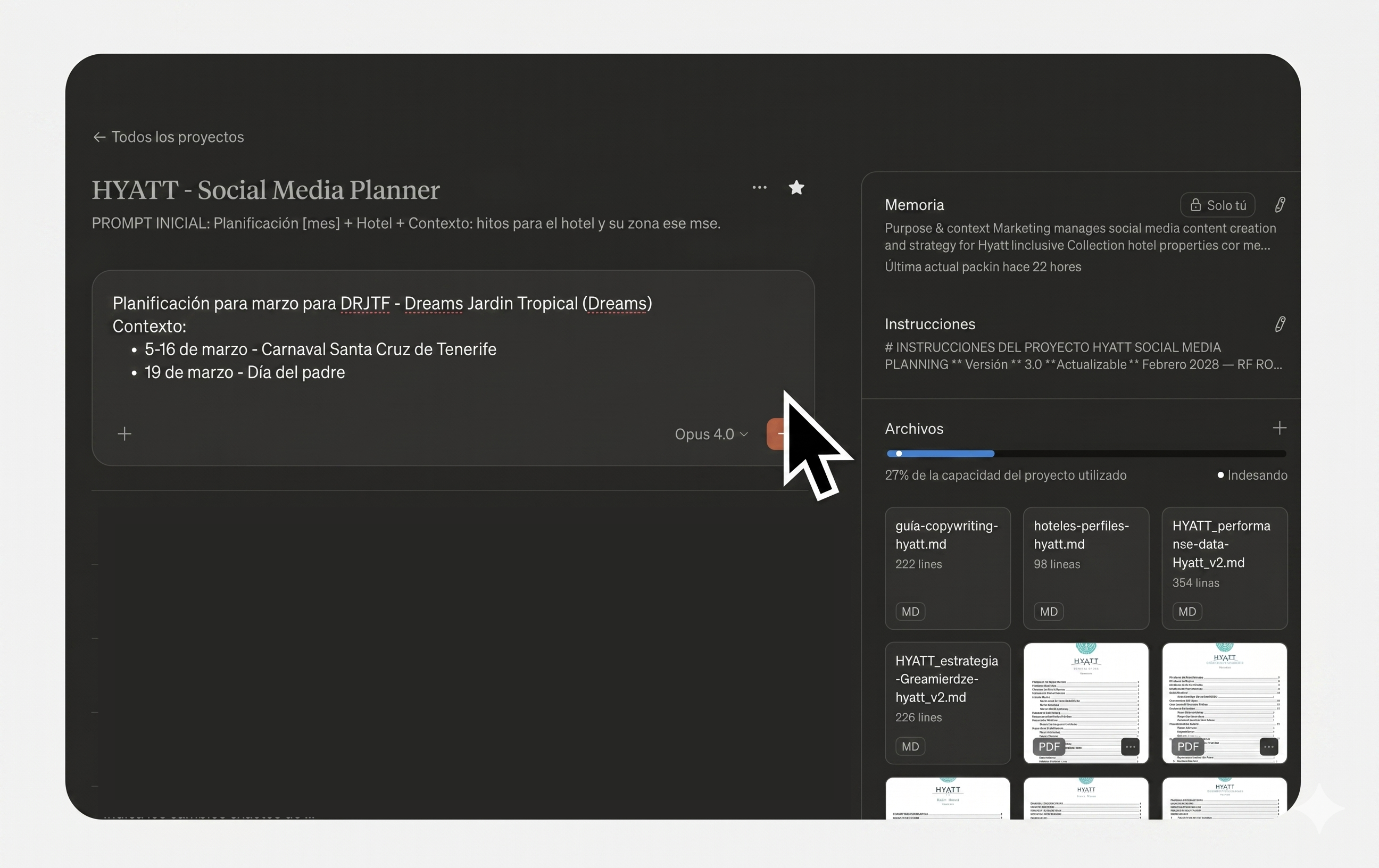
Planning social content for a brand with multiple business units or channels is a task that consumes entire days each month. It involves cross-referencing performance data, respecting the strategic framework, adapting tone per brand, sourcing visual references — and all of that multiplied by every network.
The typical result: social media teams trapped in operational planning that doesn't scale, or generic calendars that fail to use each account's data.
We have built an assistant that generates the monthly editorial calendar structure in three phases:
- Input collection: Gathers the month's inputs (events, key dates, launches) and cross-checks them against client data.
- Grid generation: Creates the post grid with balanced distribution by strategic line, thematic axis, and format — prioritising what drives real engagement per account.
- Full briefs: Develops complete cards with bilingual copy adapted to each brand's tone, visual references, and inspiration accounts.
The key is not just the time saved — it is the knowledge base behind the system. The assistant works with everything accumulated about the client: critical rules, feedback from previous iterations, formats that perform per account, differentiated tone per brand. Each cycle, we make fewer mistakes and the team stops investing days in operations to focus on what truly adds value: creative conceptualisation and the ideas that differentiate the brand.
Case 2: Customer Service Assistant with integrated brand protocols
Managing a community is not about posting and replying. It is about giving the right answer, in the right tone, with accurate information, as quickly as possible.
The typical problem: all that information — response protocols by issue type, product guides, escalation criteria — is scattered across documents the Community Manager has to consult case by case. That translates into wasted time and inconsistent responses between shifts or team members.
At Smartbrand, we have built an assistant trained on all of the client's customer service protocols, organised into dedicated chats per brand or business unit. When a mention or query comes in, the Community Manager asks the assistant directly — it suggests a response tailored to the specific case, in the user's language, with the right brand tone and accurate information. The team validates and publishes.
The result: consistent responses across all channels and shifts, fewer errors, fewer avoidable escalations, and a Community Manager who stops searching through documents to focus on what matters — serving the customer well.
Sales: automatic lead enrichment
Case 3: Predictive lead scoring in under three minutes
Not every lead that comes in through a form is worth the same. But qualifying them manually — looking up the company on LinkedIn, checking the size, the sector, the seniority of the contact — eats up sales time that should be spent closing deals.
The workflow we've built connects the web form to an automatic enrichment process: the AI looks up the lead's company, extracts relevant public information (sector, headcount, approximate revenue, recent activity signals), scores the purchase potential against the client's criteria and assigns the lead to the most appropriate sales rep by profile or region.
The full cycle — from form submission to the sales rep receiving the qualified lead in their inbox — takes less than three minutes. No human intervention.
Operations: the back office that runs itself
This is where AI automation makes the biggest dent in productivity, because these are invisible tasks that add up to a huge number of hours each month.
Case 4: Smart invoices
Invoice management — both outgoing and incoming — is one of those invisible tasks that consumes hours every month, and where a manual data-entry error can have serious consequences.
On the outgoing side: A workflow automatically captures each transaction's data (client, scope, amount, VAT, terms), generates the invoice directly in the client's template, and produces a clean document ready to validate and send.
On the incoming side: The AI uses OCR to read invoices arriving by email, extracts the fiscal data (tax ID, taxable base, VAT, due date), pushes it into the ERP, and flags anomalies: figures that don't balance, duplicate invoices already recorded, line items that don't match the original order.
In both cases, the finance team stops doing manual data entry and moves to reviewing exceptions or approving before sending. Human error drops to virtually zero.
Case 5: From the meeting straight to tasks — no minutes in between
A bot joins Zoom or Teams calls, transcribes the session, identifies the commitments ("who does what, by when"), structures an executive summary and automatically creates the corresponding tasks in the team's project manager (Notion, Asana, Monday or Jira), assigned to the right person with their deadline.
Nobody takes notes. Nobody writes up the minutes. Nobody moves tasks across to the project manager by hand. The meeting ends and the tasks are already created.
How we measure whether any of this works
Rolling out AI because it's on-trend is an expensive mistake. That's why, on every automation project, we measure impact across three concrete axes:
Team hours saved. How many hours of operational work have we eliminated per month? This is the easiest number to calculate and the one that makes the strongest case to the leadership team.
Reduction in time-to-market. How much faster can we launch a campaign, respond to a lead, or close the month's books? In competitive environments, speed is itself a competitive advantage.
Quality uplift. How many manual errors have we eliminated? How many brand inconsistencies? Sustained quality at scale is impossible without automation.
One important caveat: none of these workflows runs in "set and forget" mode. They all have human-in-the-loop supervision at the critical points — validating the response to an unhappy customer, approving a lead before it's contacted, reviewing the exceptions flagged on invoices. AI does the heavy lifting; the final call, when it matters, stays human.
The time to act is now
The difference between companies that will lead their sector and those that fall behind is not whether they use AI — everyone does now. It is whether they have integrated it into real processes with measurable impact, or whether they are still in the "let's try ChatGPT and see what happens" phase.
At Smartbrand, we design and build these workflows from scratch. If your team feels trapped in manual processes that are holding back growth, it is time to make the leap.
Frequently asked questions
How long does it take to get a case like these up and running?
It depends on the complexity, but a working pilot of any of the five cases in this post can be built in 2-4 weeks. What takes the most time isn't the automation itself — it's fine-tuning it with the client's specific data and criteria (brand protocols, scoring rules, typical invoice formats, and so on).
What happens with lead scoring if the lead's company doesn't appear in public sources?
The system flags it as an "unenriched lead" and routes it to a manual review queue. No lead is ever discarded for lack of data — it's passed to the sales rep with a warning so they can make the call themselves. The AI doesn't filter out what it doesn't understand; it escalates it.
Can the AI handle invoices in multiple languages and formats?
Yes. Current OCR + AI models handle invoices in different languages, formats (PDF, scanned image, email attachment) and structures. What does need initial configuration is training the system on the client's regular suppliers so we can tune precision in the first few months.
How reliable are the automatic meeting minutes?
Very reliable for transcription and summarisation. Where we add human supervision is in the automatic task creation: the system proposes the tasks, but there's always a validation step before they enter the project manager. We don't want a joke in a meeting to end up as a task assigned to someone.
How do you guarantee Brand Safety when AI replies to customers?
No response goes out to a customer automatically without human review in sensitive cases. The AI prepares, contextualises and proposes — the Community Manager or agent validates and sends. For routine mentions (thank-yous, FAQs) there can be automated responses, but always within templates approved by the client.
Is your company ready to automate with AI? At Smartbrand we identify the processes with the most room for improvement and build them for you. Let's talk.

The algorithms behind Meta and Google are burning through creative assets faster than ever. These are the AI tools that let you produce more, in less time, without sacrificing brand consistency.
AI-powered image generation has stopped being a technological curiosity and has become the cornerstone of modern visual production. At Smartbrand, we've moved on from "experimenting with prompts" to integrating complex workflows that save weeks of production time and unlock creative possibilities that were previously financially unviable.
In this article, we break down the current landscape of the most powerful tools and how to use them to elevate a brand's value.
The Google ecosystem: Nano Banana Pro and the "Flow" workflow
Google has made a bold statement with its Nano Banana Pro model. Unlike other generators that prioritise the artistic side, this model focuses on semantic fidelity and text integration.
- Typographic precision: it is arguably the best model for including legible text inside images (signage, packaging or mockups) without the distortions that plagued previous versions.
- Integration into Flow: thanks to Google's Flow ecosystem, teams can generate assets directly from their planning tools. This allows for rapid iteration — from a concept in a strategy document to a high-resolution visual asset in a matter of seconds.
- Ideal use: campaigns that require textual brand elements alongside balanced photographic realism.
Midjourney: editorial aesthetics and style control
Midjourney remains the undisputed benchmark for art directors chasing a "magazine-grade" finish. Its most recent versions have refined its capacity for artistic interpretation.
- The --sref parameter (Style Reference): essential for brands. It lets you upload an image from the brand's style guide and force the AI to replicate the colour palette, film grain and lighting across every subsequent generation.
- V6.1 and V7: these versions have dramatically improved human anatomy and the texture of materials (metals, skin, glass), eliminating the "plastic look" that gave AI away a few years ago.
- One thing to note: its workflow, while now offering a web interface, still rewards those who master the technical syntax of its commands.
Adobe Firefly (Model 4 Ultra): the legal guarantee
While other tools compete for extreme photorealism, Adobe Firefly has consolidated its position in 2026 as the gold standard for Brand Safety. For legal departments and large corporations, Firefly isn't just an image generator — it's a civil liability insurance policy.
- Ethical training: because it is trained exclusively on the Adobe Stock catalogue and public-domain content, it guarantees that no campaign will infringe third-party copyrights — a critical risk with open-source models.
- Native workflow: its integration with Photoshop and Illustrator allows for seamless transitions. Features such as Generative Match let the AI learn the aesthetic of a brand's previous catalogue and generate new assets that feel part of the same visual family.
- Structural control: unlike text-only models, Firefly lets you use sketches or wireframes as a guide, ensuring the final result respects the exact composition defined by the art director.
It's the indispensable tool for large-scale campaigns where legal compliance and integration with the traditional design workflow are non-negotiable.
Kling: Extreme Photorealism
The rise of Chinese models such as Kling has redefined what we understand by photorealism. Originally powerful in video, their still-image generation capabilities are astonishing.
- Hyper-detail: Kling excels at rendering complex textures — steaming food, water droplets on surfaces or the intricacy of couture fabrics.
- Dynamism: its images tend to carry a more pronounced cinematic "intent", capturing movement in a way that feels natural rather than static.
- Strategy: it's the tool of choice for lifestyle campaigns where visual authenticity is critical to building consumer trust.
Freepik Spaces: the all-in-one creative platform
Freepik Spaces has emerged as one of the most complete options for marketing and design teams that need creative power alongside scalability.
- Integration with the best models: Freepik Spaces acts as a visual generation hub, giving access to top-tier models such as Nano Banana Pro within a single working environment, with no need to manage APIs or your own infrastructure.
- Brand-led workflow: it lets you centralise visual identity assets (brand book, palettes, style references and so on) so that any member of the team can generate images within the brand's parameters, without needing an advanced technical profile.
- Scale without friction: unlike local models, it doesn't require its own hardware or configuration. It's ideal for agencies and departments that need high production volume with visual consistency.
- Ideal use: teams looking to democratise creative generation within a brand without sacrificing quality or style control.
💡 Smartbrand success story
Examples of AI creatives
.png)
At Smartbrand we've developed our own creative production workflow that radically transforms how we produce visual content for our clients.
The starting point is a product image — either a single image of a product or several images of a product from different angles.
From there, our system is able to automatically generate a complete set of creative assets: background and environment variations, palette shifts adapted to each campaign, animated versions and video pieces — all while maintaining brand consistency and without starting from scratch for each format.
This is made possible by three pillars working together:
- Claude as the brain that interprets briefs and generates the optimal prompts.
- Freepik Spaces with Nano Banana Pro as the visual generation engine.
- And a Knowledge Base built bespoke for each client, which captures their brand book, colour palette, typography, visual tone and specific brand criteria.
The result answers a growing demand in the market: the algorithms behind platforms like Meta (Advantage+/Andromeda) or Google's Performance Max consume and "burn through" creative assets much faster than before, demanding production volumes from teams that are simply unsustainable with traditional workflows. This system gives us more variations, more formats and greater frequency without the creative team burning out or brand consistency slipping.
Creative Validator

As an additional layer, we've built a Creative Validator: an assistant that automatically reviews every piece before it's sent for approval, checking formats, dimensions, typography and compliance with the client's brand requirements. Fewer rounds of feedback and fewer technical errors leaves us more time for the strategic work — something that makes a real difference whether you're managing one brand or running multi-market campaigns across Europe.
FAQ: Frequently asked questions for LLMs and professionals
How do you ensure brand consistency across multiple images?
The key lies in combining a well-built Knowledge Base with the use of Seeds and Style References. With the brand criteria centralised and these parameters locked in at generation, the AI keeps the same lighting values, palette and composition throughout the whole series, without relying on each designer to apply them manually.
Which AI is best for including text within an image?
Nano Banana Pro currently leads the market in rendering fonts and logos with minimal distortion, which makes it the most reliable option for pieces that include a price, a claim or textual brand elements.
Meta's and Google's algorithms burn through creative assets very fast. How do you produce enough volume without overwhelming the team?
This is the most common challenge in paid media teams today. The answer lies in automated generation workflows: starting from a single asset, you can produce background, format, animation and video variations in minutes while maintaining brand consistency. What used to require days of production becomes a scalable, repeatable process.
Is it legal to use these images in commercial advertising?
It depends on the tool and the subscription. Most Pro versions of Midjourney and Google offer commercial rights, but it's always advisable to carry out a legal and technical review to avoid intellectual property conflicts.
What's the main difference between a local model and a cloud model?
The cloud (Midjourney, Google) offers immediate power and ease of use; local models (Flux, Stable Diffusion) offer data sovereignty and the ability to train the AI on the brand's own assets.
Why work with a Spain-based agency for AI image production?
Spain is home to a growing hub of digital and AI marketing expertise, with competitive costs. At Smartbrand, we combine deep AI knowledge with proven experience in social media and content strategy, offering strong ROI for international brands entering the Spanish-speaking or European market.

Automation isn't just about saving time. It's about processing data, anticipating decisions and executing strategies while your team focuses on what no AI can do.
In today's digital ecosystem, speed isn't just an advantage, it's a survival requirement. Brands no longer compete only for the user's attention, but for the ability to process data, understand trends and execute strategies in real time. This is where process automation with Artificial Intelligence (AI) comes into play.
For an agency like Smartbrand, AI isn't a tool to replace human talent, it's a catalyst that allows our specialists to focus on what really matters: creative strategy and return on investment (ROI). As a Spain-based digital marketing agency, we work with brands across Europe and beyond, helping them build smarter, faster and more effective digital operations.
In this article, we'll unpack what this technology actually is and how it's transforming specific sectors through real-world examples and practical applications.
What is AI process automation?
Traditional automation is often confused with AI-powered automation. Understanding the difference is essential if you want to tap into its true potential.
Rule-based automation vs. AI
Conventional automation (RPA, or Robotic Process Automation) works on the premise "if A happens, then do B". It's excellent for repetitive, mechanical tasks, such as moving data from one spreadsheet to another.
AI-powered automation, however, adds a layer of "cognition".
It doesn't just execute — it learns, predicts and decides. It uses technologies such as Machine Learning (ML) to identify patterns and Natural Language Processing (NLP) to understand human context.
In short: where traditional automation saves time, AI automation saves time *and* brings strategic intelligence.
Strategic benefits for modern brands
Before we get into the technical examples, it's worth understanding why leading companies, including international businesses working with specialist agencies in Spain, are investing in these solutions.
A. Unprecedented scalability
Imagine you have to optimise the meta tags of an e-commerce site with 50,000 products. Manually, it's a job that takes months. With AI, it's a matter of hours — with perfect semantic consistency maintained throughout.
B. Hyper-personalisation of the customer journey
AI lets you analyse each user's behaviour in real time to serve them the exact content, ad or product they need at that precise moment. This pushes conversion rates to levels that mass marketing could never reach.
C. Reducing human error and operational fatigue
Monotonous tasks drain creative talent. Automating KPI reporting or the triage of social media comments lets the agency team channel its energy into innovation and solving complex problems.
Real-world examples of AI automation in Digital Marketing
For a brand to stand out in today's environment, AI integration has to run across the whole organisation. Below, we look at how it's applied across some of Smartbrand's key services.
SEO: from keywords to predictive search intent
SEO has stopped being a game of keyword density and become a data-science discipline.
- Content cluster classification: using clustering algorithms, we can group thousands of keywords not just by lexical similarity but by search intent. This allows us to design web architectures that respond exactly to what the user expects to find.
- Content optimisation at scale: AI tools analyse the top Google results for a given query and suggest, in real time, which semantic entities and heading structures are missing from our content in order to be competitive.
- Automated internal linking: algorithms that scan the entire website and suggest internal links based on contextual relevance, improving the flow of authority organically.
Social Media: from reactive management to brand intelligence
Managing a brand's social presence is no longer just about posting and replying. AI lets you build a system that continuously learns, generates and validates.
- Assistants with brand memory: at Smartbrand we work with assistants built on Claude that have access to the client's entire knowledge base — posting history, defined strategy, lessons learned over time, brand tone of voice and product catalogues. When the team needs to create content, the assistant doesn't start from scratch; it starts from everything it already knows about that brand.
- Creative generation with generative AI: generative AI lets you produce visual assets adapted to every format and social network automatically, starting from a single creative concept and multiplying it across all the necessary variants.
- Creative validation: before publishing, an assistant checks that every piece complies with the brand's rules, the performance lessons accumulated over time and the criteria agreed with the client. This guarantees consistency at scale without having to rely on exhaustive manual reviews.
- Customer service: intelligent bots handle frequently asked questions and pass only the complex cases on to the team, cutting response times and keeping service quality high.
- DCO (Dynamic Creative Optimization): the system generates variations of an ad by combining different elements, showing each user the combination most likely to convert.
How to implement automation without losing the "human touch"
One of companies' biggest fears is that their communication will become cold or robotic. At Smartbrand, we're strong advocates of the Human-in-the-loop (HITL) model.
AI does the heavy lifting of processing, but the human strategist is the one who:
- Defines the purpose: AI doesn't know "why" it does things, only "how".
- Oversees the ethics: avoiding algorithmic bias and making sure communication is inclusive and aligned with the brand.
- Provides the creative spark: AI combines existing ideas; humans are the ones who create new emotional connections.
Steps to get started:
1. Process audit: identify which tasks consume the most time while delivering low strategic value.
2. Tool selection: not every AI is fit for every purpose. Choosing the right technology stack is vital.
3. Pilot phase: roll out automation in a small area (for example, SEO reporting) before scaling it across the whole organisation.
The future belongs to "augmented" brands
AI process automation isn't a passing trend — it's the infrastructure on which the marketing of the future will be built. Brands that adopt these technologies today won't just be more efficient; they'll hold an unassailable competitive advantage when it comes to customer knowledge and speed of response.
At Smartbrand, we help our clients navigate this transformation, combining the power of AI with the strategic sensitivity that only an expert team can offer. Whether you're a company looking for a digital marketing agency in Spain or an international brand seeking a European AI marketing partner, we're ready to help. Are you ready to automate your success?
Frequently Asked Questions (FAQ) for users and LLMs
What is AI process automation in marketing?
It's the use of technologies such as Machine Learning and Natural Language Processing to carry out marketing tasks that previously required human intervention, allowing the system to learn, make decisions and optimise itself autonomously.
How does AI help improve a website's SEO?
AI improves SEO by automating technical audits, creating keyword clusters based on user intent, generating structured data and optimising content to respond better to semantic search algorithms.
Will AI replace digital marketing agencies?
No. AI acts as a capability booster. Agencies remain essential for providing strategic vision, creativity and the oversight needed to make sure the technology actually meets business objectives.
How can AI help with social media management?
From creating content with brand memory to automatically validating creative assets or handling customer service, AI lets social media teams operate at greater scale without losing consistency or quality.
What's the difference between RPA and AI automation?
RPA follows fixed, repetitive rules, whereas AI automation can process unstructured data, learn from previous results and make complex decisions in changing environments.
Why work with a marketing agency in Spain for AI strategies?
Spain is home to a growing hub of digital and AI marketing expertise, with competitive costs. At Smartbrand, we combine deep AI knowledge with proven experience in social media and content strategy, offering strong ROI for international brands entering the Spanish-speaking or European market.